MAGMA
Magma
Inject molten plastic into your prints to knit the layers together.
Magma is a fork of OrcaSlicer. It adds new infill types (Triangle, Rectilinear, Tri-hex, and Honeycomb cells) that build sealed vertical U-shaped channels inside your part, then injects plastic into them mid-print using the printer’s nozzle. The goal is to fix FDM Z layer weakness by truly printing in 3D.
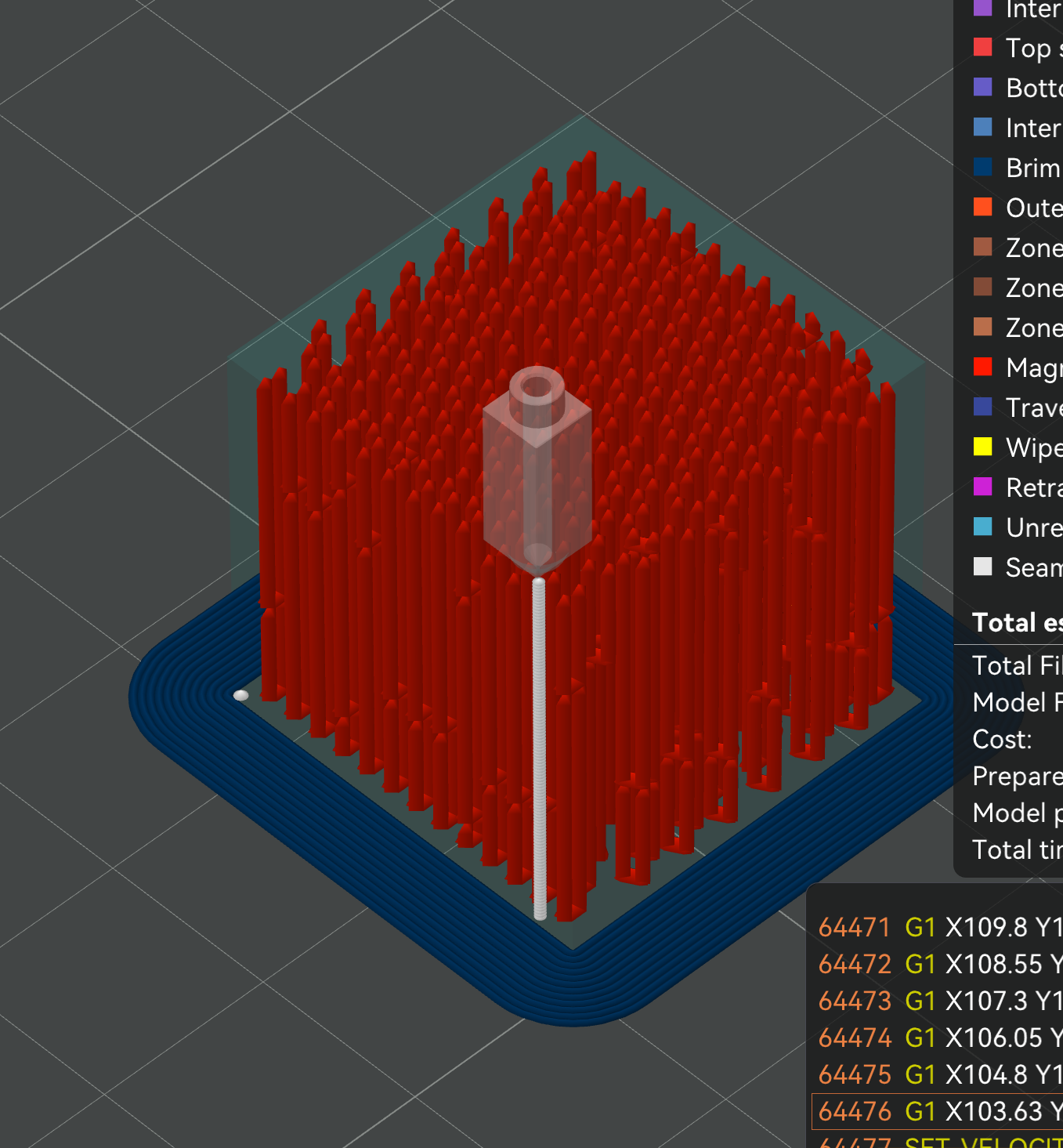
The nozzle drops into a channel, extrudes a column of plastic, lifts, and moves to the next. Every red column is one injection.
Status: It works in the slicer and it prints. TUNING.md has a known-good recipe, measured on a 0.6 mm E3D V6 with PLA. Still open: how far that generalises, and whether the reinforcement is worth the print time. I want testers with better hardware than mine. (Bug reports go to this fork, not the upstream OrcaSlicer repo.)
The problem
FDM parts are strong in XY and weak in Z. Bonding weakness on the layer lines results in parts that are much weaker and more brittle compared to injection molded ones. Magma attempts to finally solve this by injecting into U-shaped vertical channels to “knit” the part together vertically in the Z plane.
How it works
Magma replaces normal infill with a lattice of hollow channels — cells can be triangles, squares, hexagons, or a hexagon-and-triangle mix, depending on which Magma pattern you pick. A solver pairs each channel with one of its shared-edge neighbors and cuts a small window between them at the bottom, making a vertical U. During the print, the nozzle drops into one side of the U, injects plastic under pressure, and it flows down, through the window, and up the other side. Air escapes out the top. It is a tiny version of injection molding. With tubes injected as they reach their computed height during the print.
One paired cell pair, vertical cross-section:

   Before injection:        After injection:

     ┌───┬───┐                ┌───┬───┐
     │   │   │                │███│███│
     │   │   │                │███│███│
     │   │   │      →         │███│███│
     │   │   │                │███│███│
     │   │   │                │███│███│
     │       │                │███████│   ← continuous through window
     └───────┘                └───────┘

  Two adjacent triangle      Injection fills both
  cells sharing a wall,      cells in a continuous
  with a "window" gap at     U-shape, mechanically
  the bottom.                interlocking with the
                             surrounding lattice.
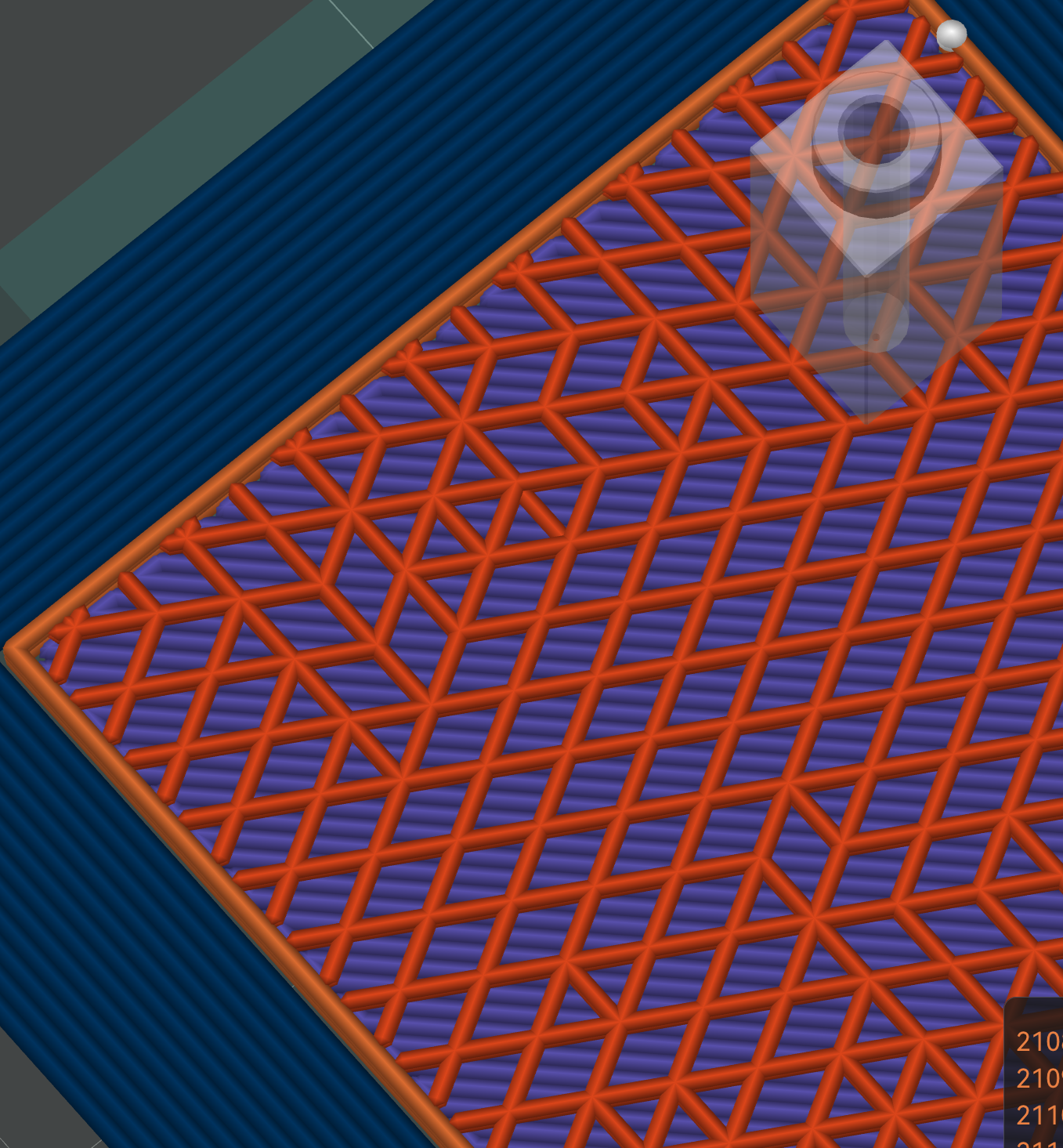
Orange is the Magma zone. The hexagonal gaps are windows, where channel pairs connect so plastic can flow from one tube into its partner.
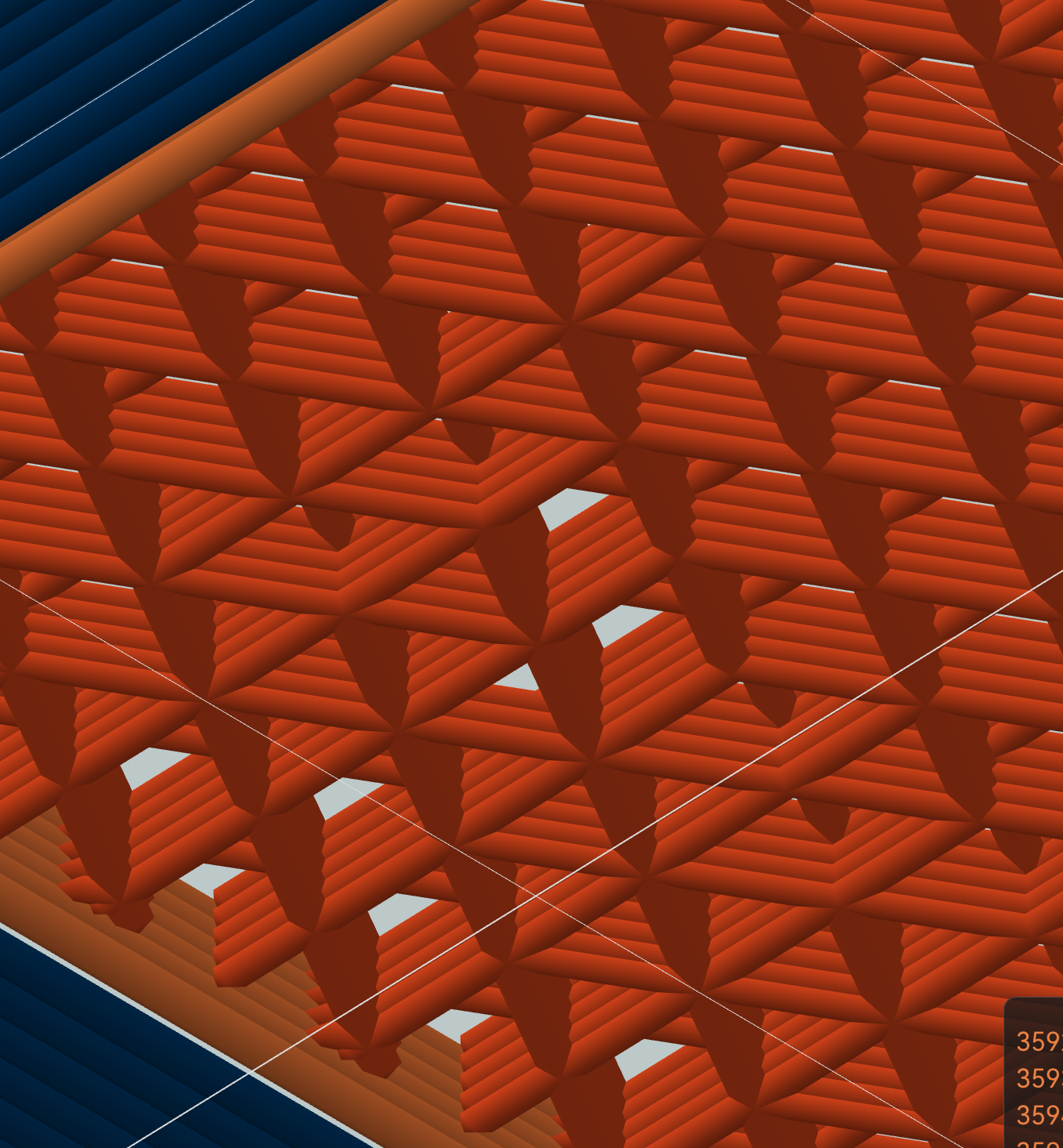
Every paired cell has a gap in its shared wall. Plastic injected into one tube flows through and fills its U-tube partner.
The solver also staggers the tube ends so neighboring tubes do not all start and stop on the same layer. That knits the part across Z instead of stacking weak seams. Slice anything with Magma infill, hide line types except injection in slicer preview, and you can see the knit for yourself.
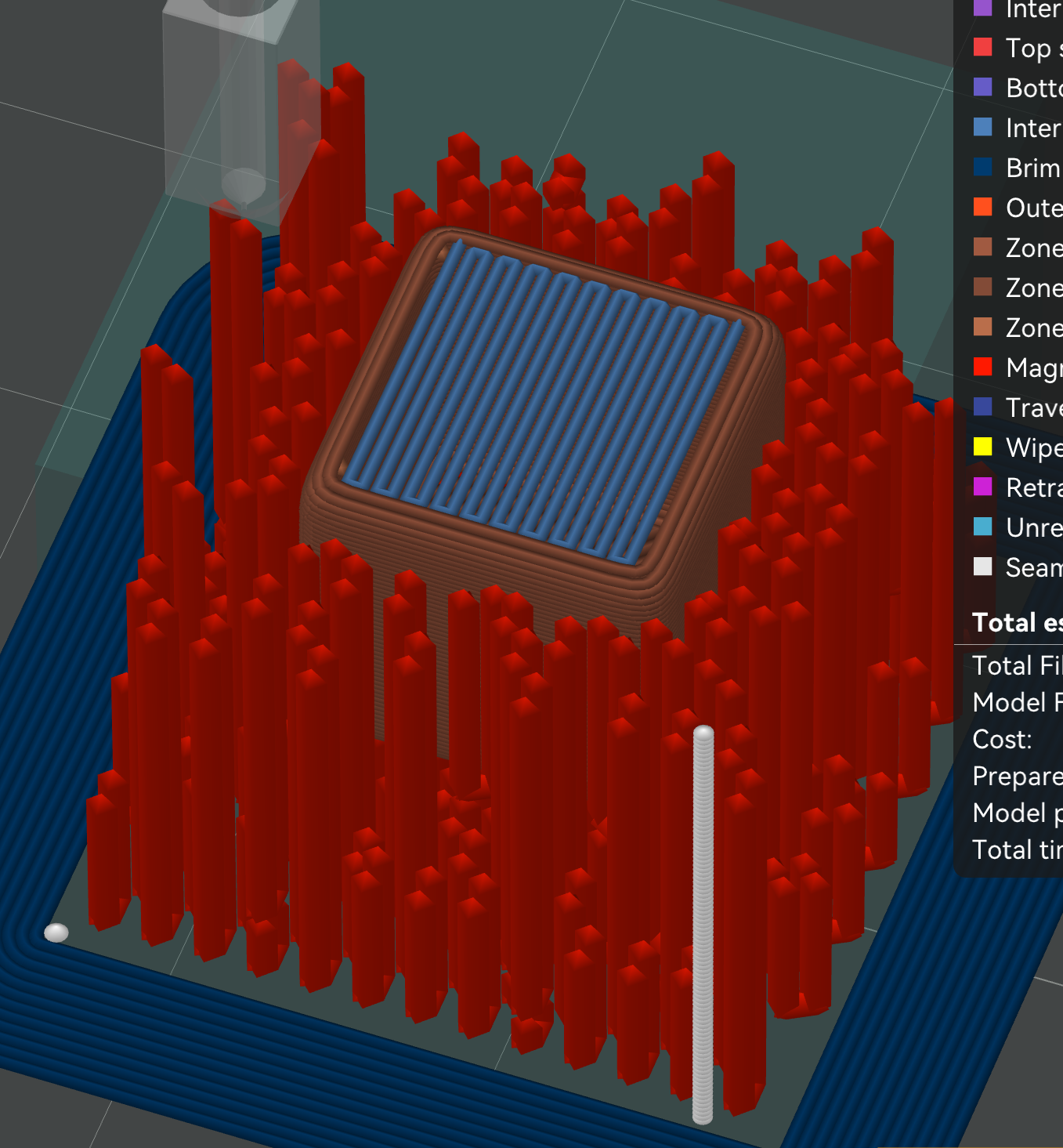
Red Magma tubes form the outer reinforcement zone around a solid blue inner zone. The cheap inner zone can use any normal infill.
What happened when I tested it
I ran about a hundred prints on an ancient clunky Ender 3. The slicer side works end to end, and the settings in TUNING.md print cleanly on that machine. Getting there took working out what actually governs a good injection, which is what the observations below are.
Observations
Tube top compromise
The tube top melts while injecting if the injection runs long, which breaks the seal. This is the dominant failure mode, and the best predictor of it is how many seconds each injection takes: 1.5 s is clean, 2 s deforms the lattice, 3 s destroys it. Injection already runs at the filament’s max volumetric rate, so the only lever is less plastic per tube. Shorter tubes first, then narrower. See TUNING.md.
Two mechanisms fit every test print and we have not separated them. Either the nozzle acts as a heat source for as long as it is sealed in, or the melt freezes partway down and backpressure pushes it out past the seal. Both worsen with longer injections. Worth trying either way: lower-viscosity injection material, a heat break or film at the nozzle face, or injecting something that is not a thermoplastic.
A related failure is neighbouring cells melting each other when injected back-to-back. That is what the Spread heat injection order is for: it spaces nearby injections out in time so the heat dissipates between them.
Injection flow limitations
Tube height is capped by the duration limit above, since volume scales with height. 3-4 mm is where the good prints are.
Worth trying: lower-viscosity plastic, higher injection temperature, higher hot-end flow, or a multi-nozzle printer with a dedicated injection nozzle. A faster material directly buys more tube.
A smaller nozzle tip flat is the highest-value hardware change. The flat sets the minimum cell you can seal, because seal depth comes from how much wider the cell is than the flat. Smaller flat, smaller cells. Every tube gets the same time budget whatever its size, so many small tubes put more plastic in than a few large ones: roughly twice as much going from a 2.0 mm flat to a 1.0 mm one. (An earlier version of this page recommended a bigger flat shoulder. That was wrong.)
Why I think it works
The most promising fix is dual material. A high heat deflection temp outer shell of something like CF-Nylon or polycarbonate, with a low viscosity low melting point injection material like high-speed PLA. I wired up dual-nozzle and per-material injection (magma_injection_filament) for exactly this. It is mostly untested, since I only have a single-extruder printer.
Other things worth trying: a high-flow hotend, short tubes, low-viscosity injection materials, nozzle coatings or heat breaks, and a nozzle with a smaller tip flat. There are a lot of knobs.
Try it
Source: MGunlogson/OrcaSlicer, magma-infill branch. Pre-built binaries: releases page. Tested on Linux, builds for all platforms.
⚠️ Printer firmware setup — REQUIRED before you print
Injection deposits a lot of plastic while the nozzle barely moves (it extrudes in place, sinking only a fraction of a millimetre). That trips firmware safety limits which assume extrusion is roughly proportional to movement. If you don’t change these, the print will either hard-abort at the first injection or inject in a fast, clamped burst that won’t pack the tube.
Klipper — in your
[extruder]section ofprinter.cfg:[extruder] max_extrude_cross_section: 5000 # in-place injection has a HUGE extrude-to-move ratio; # the default (~1.4 for a 0.6 nozzle) aborts with # "Move exceeds maximum extrusion cross section" max_extrude_only_distance: 500 # for large / no-plunge (pure-E) injectionsThese are config-only — they cannot be set from G-code at runtime, so the slicer can’t do it for you. If you still see the cross-section error, raise the value further (it must exceed
filament_area × injected_mm / plunge_depth).Marlin / RRF — no
max_extrude_cross_sectionequivalent, so injection generally works, but make sure cold-extrusion prevention won’t block it (the nozzle is hot during injection) and that your max E feedrate/jerk allow the injection rate.
To see it work: slice a part with Magma Rectilinear infill, then in the preview hide everything except injection lines. The U-tubes appear.
Starting settings — the defaults, plus the values behind the cleanest print so far. On a fresh install the only one you must set yourself is the nozzle tip flat.
| Setting | Value |
|---|---|
| Sparse infill pattern | Magma Rectilinear (default) |
| Nozzle tip flat | required — measure your nozzle’s flat tip face with calipers (a stock E3D V6 0.6 measures ~1.75 mm). Slicing fails with instructions until it is set |
| Tube interior width | 1.6 mm |
| Max tube height | 3.5 mm |
| Plunge depth | 0.4 mm |
| Injection speed | 0 — the filament’s max volumetric rate |
| Injection order | Spread heat |
| Injection dwell | 0 — leave it there, it only cooks the cell |
| Tube fill factor | 0.9 |
Read TUNING.md before your first print. Short version: keep each injection under about 1.5 seconds and the seal deeper than 0.4 mm. Those two bound everything else.
On patterns: all four print. Rectilinear is the default for print speed and printability, and it is what the tuning guidance was measured on. Honeycomb and Tri-hex have rounder openings, which helps sealing, but honeycomb sealed poorly on the one plate that tested it. Magma Triangle has the worst geometry of the four, and the slicer warns if you pick it. See PATTERNS.md.
Help wanted
I am out of patience for solo test prints, so I am releasing it. What would actually move this forward:
- A dual-nozzle or high-flow printer injecting PLA into a CF-Nylon or PC shell.
- Strength numbers: Magma vs solid infill at the same mass.
- The setting combination that finally gives a clean fill on complex parts.
If you get something working, or figure out why it will not, open an issue.
Why release it before it’s fully tested?
I built this quietly, then published everything: the code, and a defensive publication dedicating the techniques to the public domain, so the specific mechanisms here stay available to the community. The big advances in 3D printing have always been community efforts.
In-print cavity injection is not new — ORNL published Z-pinning in 2018, and AIM3D’s Voxelfill ships commercially through Create it REAL. What has been missing is an open implementation: the prior work needs either a research lab, an industrial pellet machine, or a modified hot end. Magma runs on a stock printer and a free slicer, so anyone can experiment. See Relationship to prior art for what is borrowed and what is new.
More
- How it works: the mechanism in detail, with diagrams.
- Patterns: the four cell shapes and how they compare.
- Tuning guide: the settings that work, why, and how to adapt them.
- DESIGN-TUBE-SOLVER.md: the greedy + CP-SAT tube assignment solver.
- DEFENSIVE_PUBLICATION.md: full algorithm and architecture disclosure (CC0 1.0). Published May 6, 2026; two addenda dated August 25, 2026 record what testing superseded and disclose mechanisms the original text missed.
License
See LICENSE for the full text.
The slicer code is AGPL-3.0, inherited from upstream OrcaSlicer, of which it is a derivative work — it lives in its own repository. Documentation in this repository is MIT. DEFENSIVE_PUBLICATION.md is CC0 1.0 Universal, a public domain dedication covering the disclosure and the techniques it describes — not the code, which cannot be CC0 while it derives from AGPL upstream.
Contact
Issues and findings: fork issues for the slicer, docs issues for the docs. Not the upstream OrcaSlicer repo. Mark Gunlogson, GitHub.